
Atlas has launched Sales Operations, a CRM that connects customer records, sales pipelines, quotes, orders, and reporting with the AI Employees working alongside your team. A representative can ask their Chief of Staff to log a call and set a follow-up. A manager can ask for a report comparing pipeline value, lead conversion, or sales credit across people and AI Employees. Both work from the same commercial records.
We built it because sales work already depends on much of the information Atlas holds. A customer wants a quote for a product. The salesperson needs the current price, the available stock, and the terms the business can offer. Once the customer accepts, operations needs to fulfill the order and finance needs to invoice it. Keeping that chain connected was the starting point for Sales Operations.
Start with the customer and the next step
A useful customer record has to explain the relationship. Who buys? Who approves? Which location needs the delivery? Who on your team owns the next conversation? Sales Operations brings accounts, contacts, customer locations, leads, and opportunities into a shared workspace. Teams can configure their own pipelines and stages, assign responsibilities, and see a deal’s value, owner, and next step.
The details vary by business. An equipment sale may need two demonstrations and a technical review before a quote. A distributor may sell the same product repeatedly under agreed pricing. A freight team may quote a service tied to a shipment. Sales Operations supports goods and services, product catalogs and price books, and links to inventory where the sale depends on particular stock. Those relationships continue through the commercial work that follows.
Update the CRM through your Chief of Staff
Consider the few minutes after a customer call. The representative knows what changed, but the CRM needs several updates. The call belongs on an account, the opportunity needs a new note, and someone needs a reminder to send specifications before Friday. That is a practical job for the representative’s private Chief of Staff.
“I spoke with the buyer for ten minutes. They want pricing for the larger order and need the specifications by Friday. Log the call and add a follow-up for Thursday afternoon.”
The Chief of Staff can save the call against the relevant records, including its duration, outcome, notes, and agreed next step. Follow-ups become dated tasks that can be completed or rescheduled. The next person opening the deal can see what happened and what needs doing.
Review a recording before saving the notes
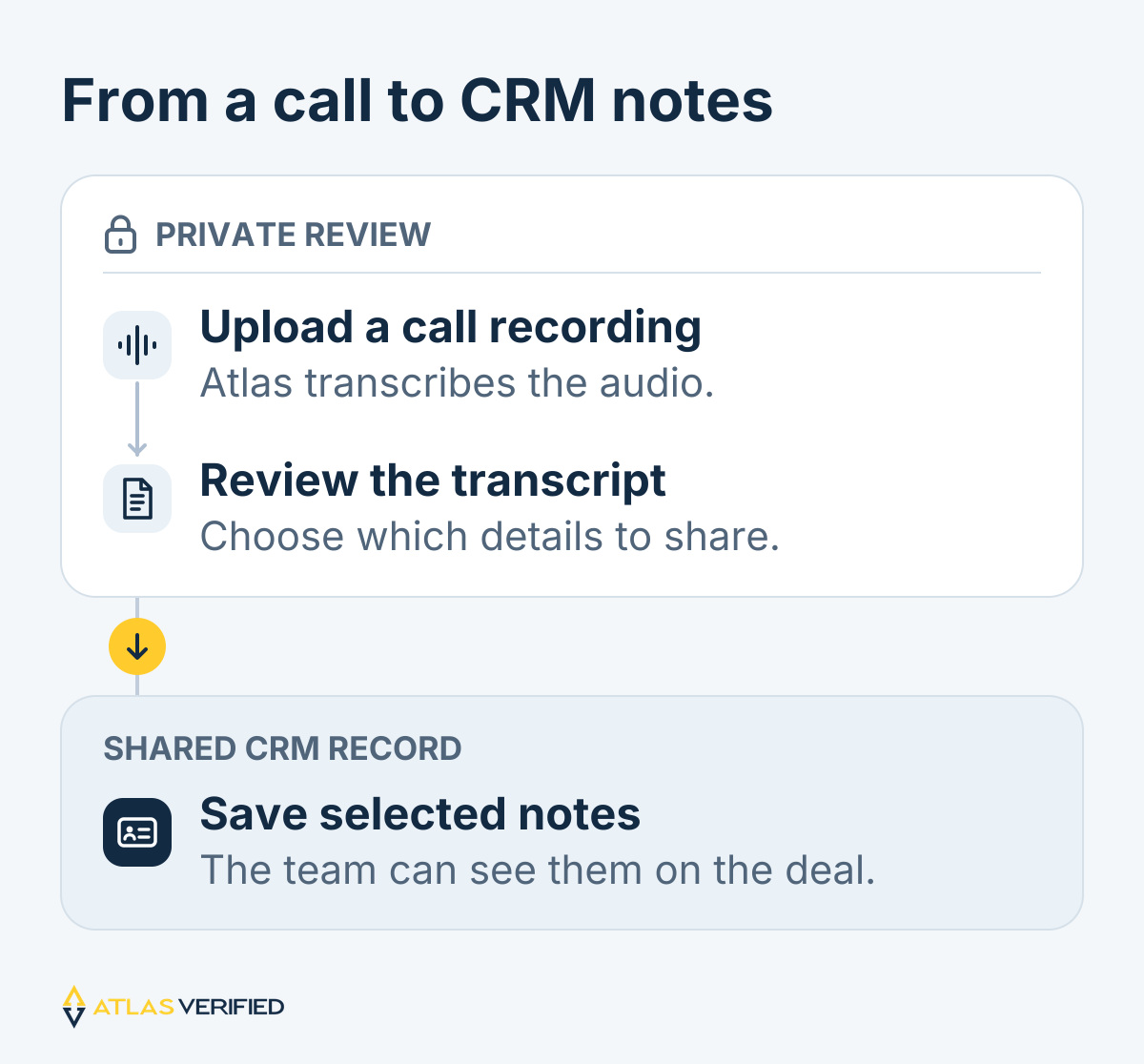
Representatives can also upload a WAV or another supported audio recording for transcription. The transcript is private to its owner, who reviews it and chooses what to save into the CRM. That gives the team useful customer notes while keeping the full recording and private conversation separate from shared sales reporting.
Give people and AI Employees defined roles
Sales Operations lets administrators assign sales roles to both people and AI Employees. An AI SDR can research assigned accounts, prepare outreach, and help arrange meetings through its authorized tools and connected inbox and calendar. A human representative can then take the meeting with the account research and buyer’s questions already available. Each employee’s access depends on the permissions and connections configured for it.
We also built attribution for work that involves more than one participant. A quote can assign sales credit between a person and an AI Employee, with that split carried into the accepted order and commission records. The person responsible for an account, the employee that performed an action, and the recipient of sales credit are recorded separately. Managers can examine each contribution without assigning all of an assistant’s work to its human operator.
Ask for the report you need
The reporting work starts with a question. Which lead sources reached accepted orders? How much pipeline does each representative own? What did an AI SDR contribute this month? Which follow-ups are overdue? Sales Insights provides a place to inspect these measures, and Atlas Chat can assemble a report with the tables and charts appropriate to the question.
For example, a manager can request a table of this quarter’s accepted orders, a donut chart of lead sources, bars comparing sales credit, and weekly lead and order trends. The reporting tool supports filters, groupings, and comparisons across 13 sources of sales data. Its 17 chart types include grouped and stacked bars, multi-series lines, funnels, waterfalls, and scatter plots. Teams can export tables as CSV, individual charts as SVG, and complete report data and definitions as JSON.
The definitions stay with the numbers
Charts and tables come from the same returned results. A lead conversion rate includes the group of leads it measures. Accepted order value stays distinct from collected cash, and amounts remain separated by currency. Reports use the records the requesting person or employee is allowed to access. This makes a chart easier to question, explain, and use in a sales review.
Carry the agreement through fulfillment and payment
When a customer accepts a quote, the commercial work continues in Atlas. Teams can create the order, reserve available stock, track partial fulfillment and returns, and issue sales invoices. Finance can apply confirmed payments, inspect open balances, and record credits. The customer’s agreed terms remain connected to those later events.
Commission rules are configured by the organization. A business can track credit and earnings according to its own plan, with adjustments recorded as the underlying facts change. Recording a payment or commission does not initiate a bank transfer. Sales Operations maintains the commercial and receivables records that people need to review and act on.
Set up Sales Operations for your team
Administrators can enable Sales in Atlas, assign roles, and configure pipelines, products, pricing, and compensation plans. Representatives can work in the Sales workspace or ask their Chief of Staff to help with the same records.
Explore Sales Operations, or bring a deal to a walkthrough and follow it from the first conversation through the order.